

Pre-incorporation
Getting set up: TIN and eSECURE
The first step for every incorporator, authorized representative and officer — a TIN, then a verified eSECURE account — and what to send Korp.
The SEC authenticates every incorporator, authorized representative and officer online before it accepts an incorporation. Each of them therefore needs two things: a Tax Identification Number (TIN) and a verified eSECURE account, the SEC's personal digital ID used to sign and authenticate documents.
Follow the order: TIN first, then eSECURE. Your TIN is entered and verified in eSECURE, so the account cannot be completed without it.
- You already have a TIN (usually the case for Philippine individuals): go straight to step 2.
- You don't have a TIN (usually the case for foreign individuals): start with step 1.
Step 1: TIN registration#
Korp handles this, in about 3 business days.
- Fill in the TIN form, one per person. Korp sends it to you; if you don't have it, email support@korp.ph.
- Email it to support@korp.ph with a copy of your passport photo page.
The form asks for your given name, middle name ("N/A" if none) and surname exactly as on your passport, date of birth (YYYY/MM/DD), country of birth, nationality, home address, contact number, email address, your mother's full maiden name and your father's full name.
Korp files the application with the BIR and sends you your TIN. An incomplete form is the most common delay, so check every field before sending. A person may hold only one TIN, so never apply for a second one.
Step 2: eSECURE account and KYC#
You complete this yourself, in 15 to 30 minutes.
Register at esecure.sec.gov.ph. Before you start, have ready:
- your TIN
- your own email address and mobile number; both are verified with a one-time code
- two valid government-issued IDs
Then:
- Create your account and verify your email and mobile number.
- Log in and start credentialing. Enter your TIN and your name exactly as on your IDs. The SEC's fee is PHP 400, valid for 2 years; renewal is PHP 250.
- Upload your two IDs and complete the face verification.
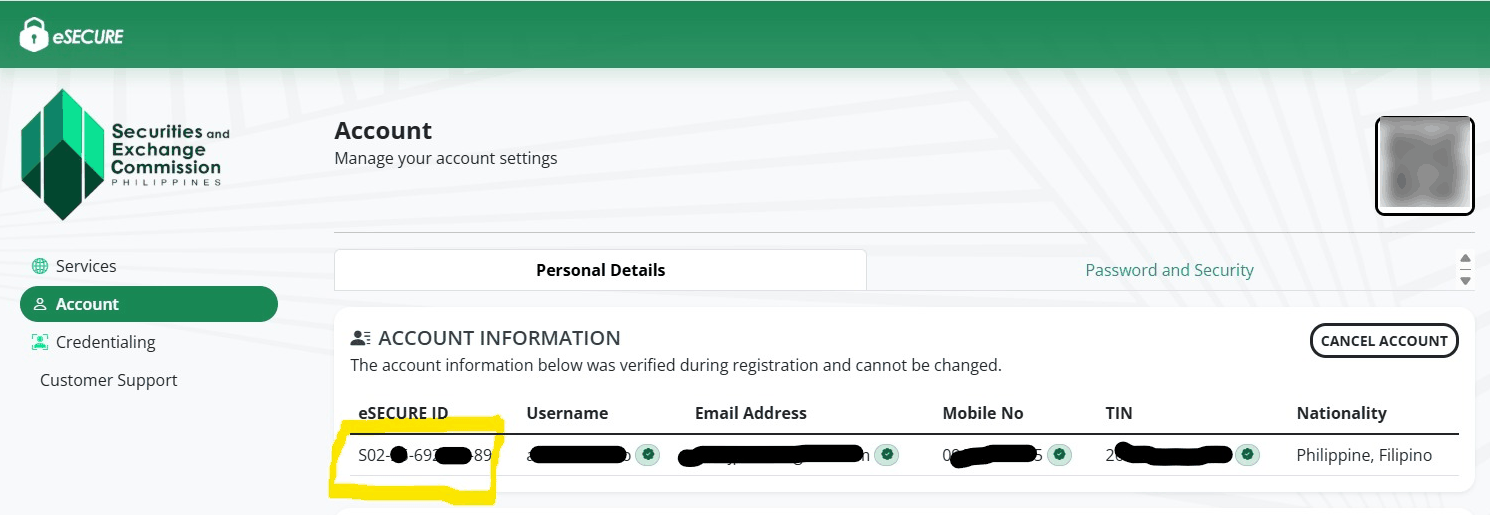
- Wait for verification. Your eSECURE ID and QR code then appear on your Account page, with your TIN marked as verified.
- Email your eSECURE ID with a screenshot to support@korp.ph. Korp files with the SEC once it has one from every person.
Trouble paying the PHP 400 fee? Email support@korp.ph with your WhatsApp number and Korp will contact you. You'll then send a screenshot of the QRPH payment code shown in eSECURE. The code is valid for 10 minutes only, so send it as soon as it appears. Korp pays the fee for you, and you reimburse it later.
Where to find your eSECURE ID#
In eSECURE, go to Account › Personal Details. The eSECURE ID is the first field under ACCOUNT INFORMATION, highlighted below.
Use your own details#
Use your own email, mobile number and IDs: eSECURE is a personal identity and cannot be created on your behalf, by Korp or anyone else. Changing your name or other details later invalidates the credential and costs PHP 100 to redo, so check the spelling at registration.
For how the BIR registers foreign individuals for a TIN, see How to get a TIN as a foreign individual.
Next: the incorporation process.